一个简单的网页布局
2,561 阅读
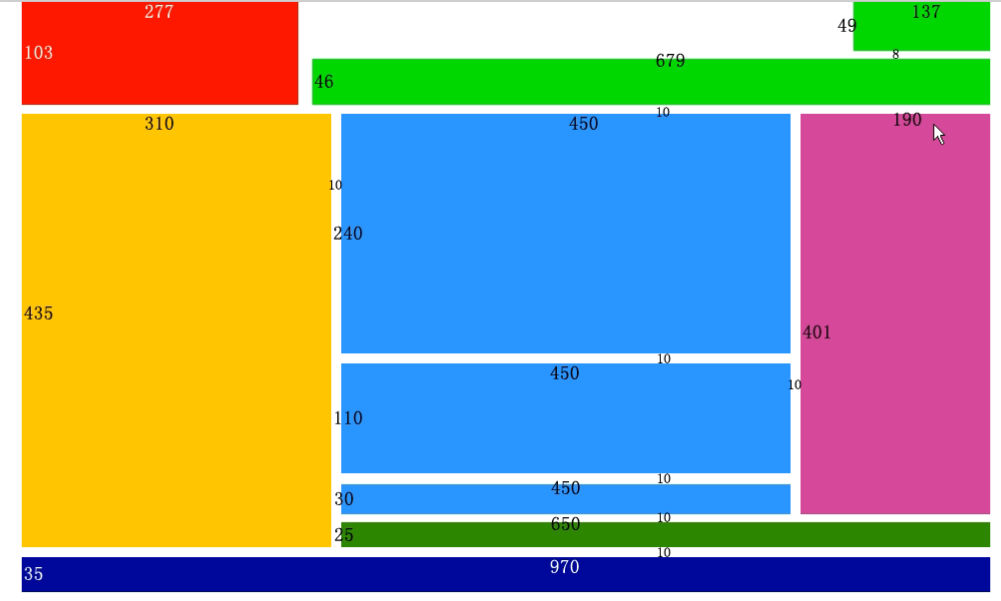
<style type="text/css" media="screen">
*{
margin: 0;
padding: 0;
}
.header{
width: 970px;
height: 103px;
margin: 0 auto;/*这个语句表示居中*/
}
.logo{
width: 277px;
height: 103px;
float: left;
margin: 0 auto;
background-color: red;
}
.login{
width: 137px;
height: 49px;
float: right;
background-color: yellowgreen;
margin-bottom: 8px;
}
.mulu{
width: 679px;
height: 46px;
float: right;
background-color: yellowgreen;
}
.content{
width: 970px;
height: 435px;
margin: 0 auto;;
margin-top:10px;
margin-bottom: 10px;
}
.ct1{
width: 310px;
height: 435px;
float: left;
background-color: yellow;
}
.ct2{
width: 190px;
height: 401px;
float: right;
background-color: pink;
margin-bottom: 10px;
margin-left: 10px;
}
.ct3{
width: 450px;
height: 240px;
float: right;
background-color: skyblue;
margin-bottom: 10px;
}
.ct4{
width: 450px;
height: 110px;
float: right;
background-color: skyblue;
margin-bottom: 10px;
}
.ct5{
width: 450px;
height: 30px;
float: right;
background-color: skyblue;
}
.ct6{
width: 650px;
height: 25px;
float: right;
background-color: yellowgreen;
}
.botton{
width: 970px;
height: 35px;
margin: 0 auto;
background-color: blue;
}
</style>
</head>
<body>
<!-- 头部 -->
<div class="header">
<div class="logo">logo</div>
<div class="login">login</div>
<div class="mulu">导航栏</div>
</div>
<!-- 主体 -->
<div class="content">
<div class="ct1">内容1</div>
<div class="ct2">内容2</div>
<div class="ct3">内容3</div>
<div class="ct4">内容4</div>
<div class="ct5">内容5</div>
<div class="ct6">内容6</div>
</div>
<!-- 底部 -->
<div class="botton">网站声明</div>
</body>
DataLearner 官方微信
欢迎关注 DataLearner 官方微信,获得最新 AI 技术推送